---
template: "page.peb"
title: "Connections"
displayName: "Connections"
description: "Connection catalog for iDialogue Agent Skills and external service integrations."
category: "connection"
contentType: "guide"
audience: "admin"
tags: "connections,agent-skills,governance"
section: "connection"
seoTitle: "iDialogue Connections"
seoDescription: "Review iDialogue Connections used by Agent Skills to call approved external services."
---
## Connections
Agent Skills make governed calls to external services through Connections. Configure a Connection once, then approved Skills can reuse it across agents without embedding credentials in prompts or page configuration.
iDialogue installs with a set of pre-built managed connections for common services.
Governance connections are enabled through the [Governance tier](/pricing.html). Contact support@idialogue.app to review requirements or enable a Connection for production use.
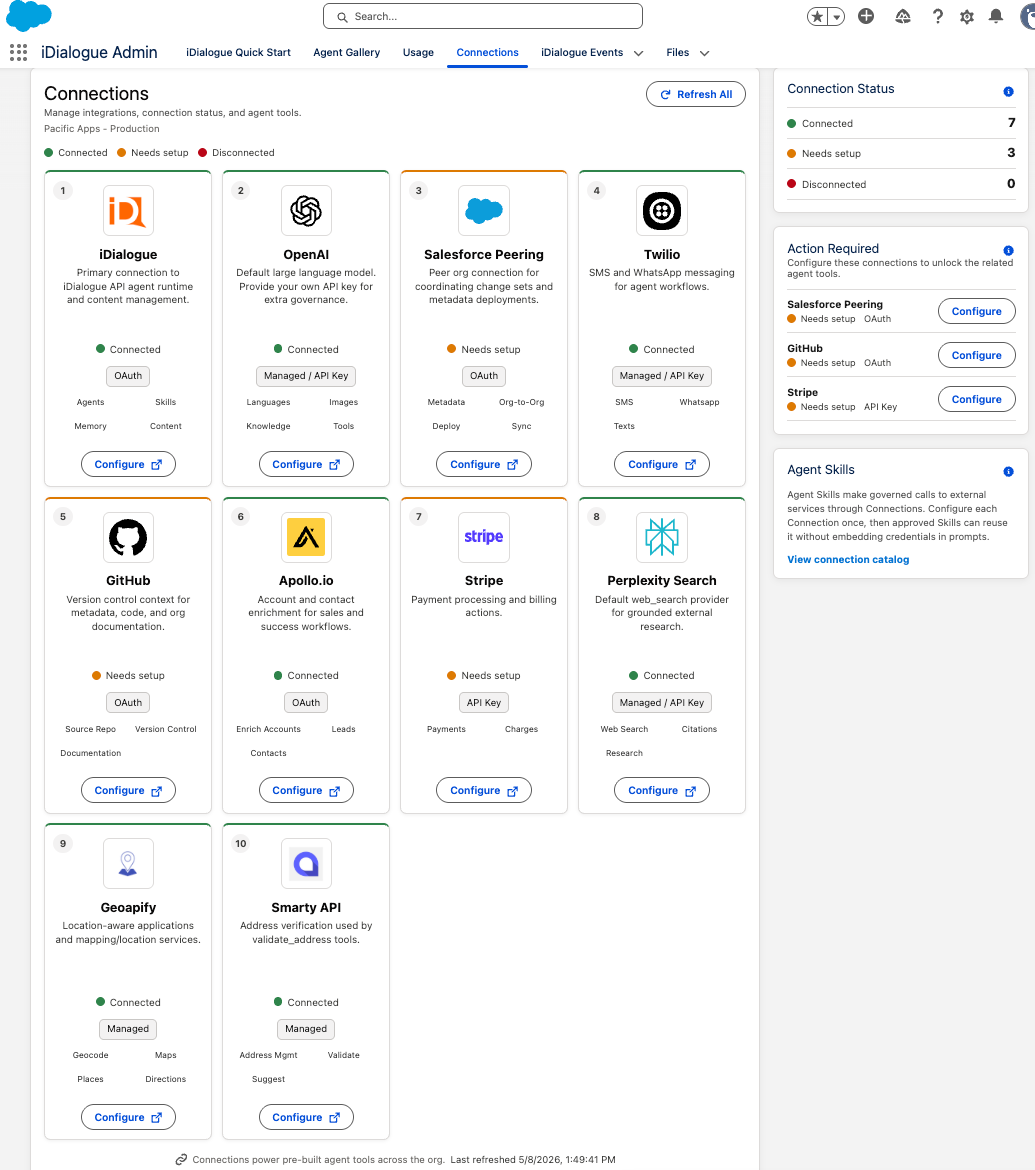
In Salesforce, open the "iDialogue Admin" app and select the "Connections" tab to review connection status, launch OAuth authorization flows, and manage credential-backed services.
| Logo | Connection | Type | Agent Skill uses |
| --- | --- | --- | --- |
|  | [iDialogue](/product/ai-agent-runtime.html) | OAuth | Agents, Skills, Memory, Content |
|
| [iDialogue](/product/ai-agent-runtime.html) | OAuth | Agents, Skills, Memory, Content |
|  | [OpenAI](/connections/openai.html) | Managed / API Key | Languages, Images, Knowledge, Tools |
|
| [OpenAI](/connections/openai.html) | Managed / API Key | Languages, Images, Knowledge, Tools |
|  | [Salesforce Peering](/connections/salesforce-peering.html) | OAuth | Metadata, Org-to-Org, Deploy, Sync |
|
| [Salesforce Peering](/connections/salesforce-peering.html) | OAuth | Metadata, Org-to-Org, Deploy, Sync |
|  | [Twilio](/connections/twilio.html) | Managed / API Key | SMS, WhatsApp, Texts |
|
| [Twilio](/connections/twilio.html) | Managed / API Key | SMS, WhatsApp, Texts |
|  | [GitHub](/connections/github.html) | OAuth | Source Repo, Version Control, Documentation |
|
| [GitHub](/connections/github.html) | OAuth | Source Repo, Version Control, Documentation |
|  | [Apollo.io](/connections/apollo.html) | OAuth | Enrich Accounts, Leads, Contacts |
|
| [Apollo.io](/connections/apollo.html) | OAuth | Enrich Accounts, Leads, Contacts |
|  | [Stripe](/connections/stripe.html) | API Key | Payments, Charges |
|
| [Stripe](/connections/stripe.html) | API Key | Payments, Charges |
|  | [Perplexity Search](/connections/perplexity-search.html) | Managed / API Key | Web Search, Citations, Research |
|
| [Perplexity Search](/connections/perplexity-search.html) | Managed / API Key | Web Search, Citations, Research |
|  | [Geoapify](/connections/geoapify.html) | Managed | Geocode, Maps, Places, Directions |
|
| [Geoapify](/connections/geoapify.html) | Managed | Geocode, Maps, Places, Directions |
|  | [Smarty API](/connections/smarty-api.html) | Managed | Address Mgmt, Validate, Suggest |
## Manage Connections in Salesforce
The Connections tab in the "iDialogue Admin" app shows each available service, the connection type, and the actions available for that service. OAuth connections such as iDialogue, Salesforce Peering, GitHub, and Apollo.io can be authorized or reconnected from this tab.
| [Smarty API](/connections/smarty-api.html) | Managed | Address Mgmt, Validate, Suggest |
## Manage Connections in Salesforce
The Connections tab in the "iDialogue Admin" app shows each available service, the connection type, and the actions available for that service. OAuth connections such as iDialogue, Salesforce Peering, GitHub, and Apollo.io can be authorized or reconnected from this tab.