
Inbound Email Handler
Give Salesforce users a personal email assistant for turning everyday email instructions into Salesforce updates.
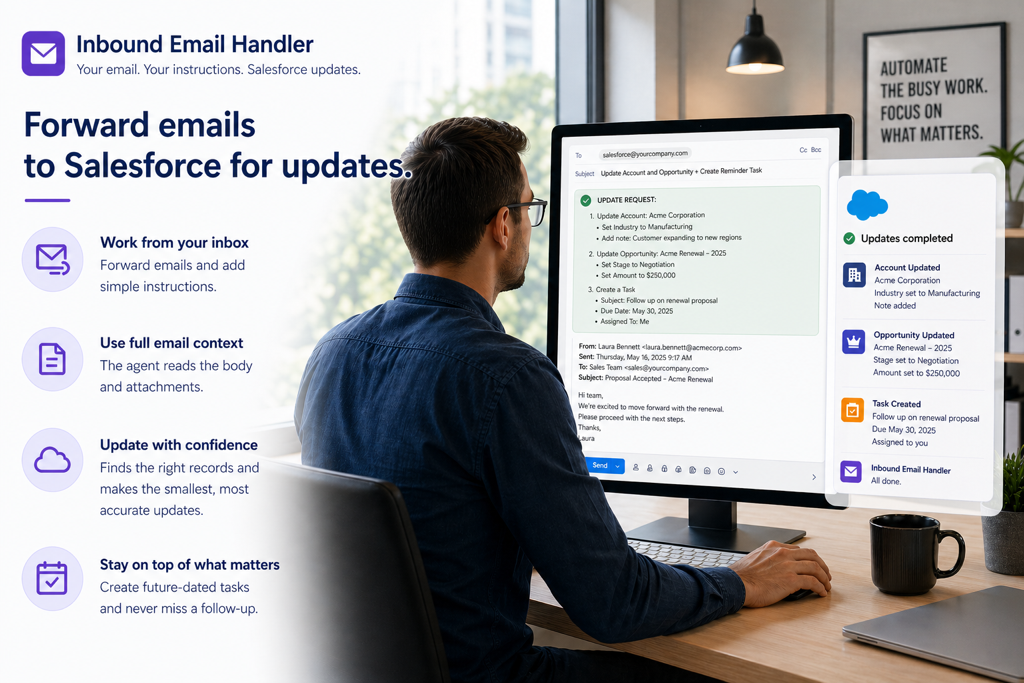
Inbound Email Handler is designed for Salesforce users and trusted allow-list senders who need a practical way to update records from email. A user can forward a message, add instructions at the top, and let the agent use the email body and attachments as context for the requested Salesforce action.
This agent is intended for trusted internal and partner-style workflows, not customer-facing email response automation. Other iDialogue email agents are available for customer support, case handling, and externally facing email use cases.
Why teams use this agent
- Give users a simple email-based path for updating Salesforce records when they are already working from their inbox.
- Reduce manual entry after meeting summaries, customer updates, partner messages, and internal follow-ups.
- Inbound email agent converts instructions into Tasks, Notes, Leads, Contacts, Accounts, Opportunities, or other supported updates.
- Reads email attachment files when needed for context, and links them to the relevant records.
- Manage an allowlist of trusted senders.
What it handles
- Reads the user's instructions at the top of a forwarded email.
- Separates the user's request from the original forwarded message or quoted thread.
- Uses the email body and linked files to understand the supporting context.
- Processes email attachments when the workflow needs supporting documents, up to 25 MB total attachment size.
- Queries Salesforce to identify referenced Accounts, Contacts, Opportunities, and related records before making updates.
- Creates or updates the smallest useful set of Salesforce records for the requested outcome.
- Marks duplicate intake records so the same forwarded email does not trigger repeat work.
Inputs and prerequisites
- A configured Salesforce Email Service that implements a pre-built Apex handler in the iDialogue package.
- An allow list for approved Salesforce users and other trusted senders.
- Install the Inbound Email Handler agent from the agent gallery
- Agent permissions for the Salesforce objects the team wants it to query or update.
- Clear forwarding instructions from users, ideally written above the original email content.
Setup and configuration
- Install the agent and assign access to the admins or developers responsible for the inbound email workflow.
- Configure the Salesforce Email Service address that creates inbound email intake records.
- Define the trusted sender allow list for users who can submit email-based Salesforce updates.
- Define a common email address or Google group, such as salesforce@domain.com, and forward to the Salesforce Email Service address.
- Test with common forwarded-email patterns before inviting users to rely on the workflow.
Governance and controls
- Limit write permissions to the Salesforce objects and fields the workflow truly needs.
- Keep the sender allow list current as users, teams, and partner access change.
- Require the agent to query before writing when a message references an Account, Contact, Opportunity, or other existing record.
- Customize the Inbound Email Agent using Agent Builder. Test in a sandbox environment.
- Monitor agent transcripts and credit consumption.
Success metrics
- Faster turnaround from email receipt to Salesforce follow-up.
- Capture customer conversations at the moment of engagement, not hours later when a user has time to log in and update records.
- Accurate annotation of email attachments and notes, related to CRM source records: Account, Contact, Opportunity, Case, etc.
- Extract details from email attachment without having to read the file manually, and link it to the relevant Salesforce record.
Next steps
- Pair with Agent Builder to tune instructions for your team's specific inbound email workflows.