
Trust Center · AI & Agent Governance
Controlled authority for every agent
Agents do not receive unrestricted access to Salesforce. They execute through the Salesforce API connection user configured by the Salesforce Admin. Enabled tools, workflow rules, approval requirements, monitoring, and stop controls narrow that authority further.
The model does not hold Salesforce credentials or independently browse an org. It receives selected context and can invoke only the tools exposed for that run.
Layers of agent control
An iDialogue agent operates within several configurable layers:
- Instructions that define its purpose and boundaries;
- Salesforce context selected for the workflow;
- Knowledge and dialogue continuity approved for the use case;
- Skills and tools enabled for the current execution context;
- Connections that determine access to Salesforce and external services;
- AI models and processing providers selected for the workflow;
- Experience, Room, audience, and sharing rules that govern customer-facing delivery and input;
- Human review and approval requirements surrounding consequential actions; and
- Transcript, usage, and audit records that provide operational visibility.
Administrators configure these controls for the specific agent and workflow rather than granting every agent the same capabilities.
Authority and approvals
The configured Salesforce API connection user is the primary Salesforce authority boundary. What an agent can do is narrowed further by the data supplied to it, enabled skills and tools, workflow configuration, and any required approval steps.
The following diagram illustrates the governance pattern for actions that may create or change business data:
flowchart TD
    Start["User or background event starts an agent"] --> Context["Resolve record, file, tenant, and run context"]
    Context --> Tools["Offer only tools permitted for that run context"]
    Tools --> Scope["Apply object, field, operation, and instruction boundaries"]
    Scope --> Consequence{"Does the action require review?"}
    Consequence -->|"Yes"| Confirm["Show the proposed action and request confirmation"]
    Consequence -->|"No, explicitly authorized"| Execute["Execute within configured authority"]
    Confirm -->|"Approved"| Execute
    Confirm -->|"Rejected"| Stop["Stop without the side effect"]
    Execute --> Audit["Record configured transcript, tool, and credit evidence"]
    Audit --> Result["Return the result to Salesforce or the user"]
An agent's effective authority is constrained by:
- the data and context supplied to the run;
- active skills and tools;
- the Salesforce or external Connection identity;
- object, field, record, endpoint, and operation access available to that Connection;
- workflow-specific approval requirements; and
- downstream sharing or publication configuration.
Salesforce Admins choose and govern the connection user. External workflows should not be assumed to automatically reproduce all row-level sharing and field-level security of the initiating Salesforce user, so the connection user's permissions should be reviewed for the intended business process.
Human review and approval
iDialogue workflows can require human review before consequential actions are completed. Review is particularly relevant for:
- extracted names, dates, amounts, requirements, and compliance obligations;
- new or updated Salesforce records;
- commercial commitments and customer-facing claims;
- generated proposals, agreements, quote explanations, and handoff documents;
- external messages, invitations, Rooms, or public pages;
- customer-submitted forms, checklist responses, uploads, review decisions, and eSignature outcomes; and
- actions that consume material credits or invoke paid Connections.
Approval requirements are configurable by workflow. Administrators can design agents to propose an action for review, require explicit confirmation, or execute pre-authorized actions automatically.
Interactive and background agents
iDialogue agents can run interactively from Salesforce, operate on files, or execute automatically in response to configured events. Each execution mode can expose a different set of approved skills and tools based on its run context.
Background agents can continue an approved assignment after an interactive request has completed. Administrators can monitor that work and stop it when needed. Before activation, they should review the initiating event, permitted data, available actions, retry behavior, usage budget, destination for results, and exception-handling path.
AI provider governance
iDialogue supports OpenAI for selected language, image, file, and agent workflows. A deployment can use an iDialogue-managed provider account or, for approved deployments, a customer-provided API key.
Provider credentials govern the provider account. They do not give a model standing access to Salesforce. Each request includes only the context, files, instructions, and tools supplied by the configured iDialogue workflow.
Model training
Customer data processed through the iDialogue-managed OpenAI API integration is not used to train OpenAI models. Optional provider feedback, evaluation, fine-tuning, and service-improvement programs are separate activities and are not part of the standard managed integration.
Dialogue continuity and task processing
Dialogue continuity is an intentional iDialogue capability. Approved context can carry forward so users do not have to re-teach an agent or repeat earlier conversations.
Document generation, OCR, image analysis, file Q&A, and transactional steps are task-based processing. They use the information required to complete the task without automatically adding it to dialogue history.
Provider application state
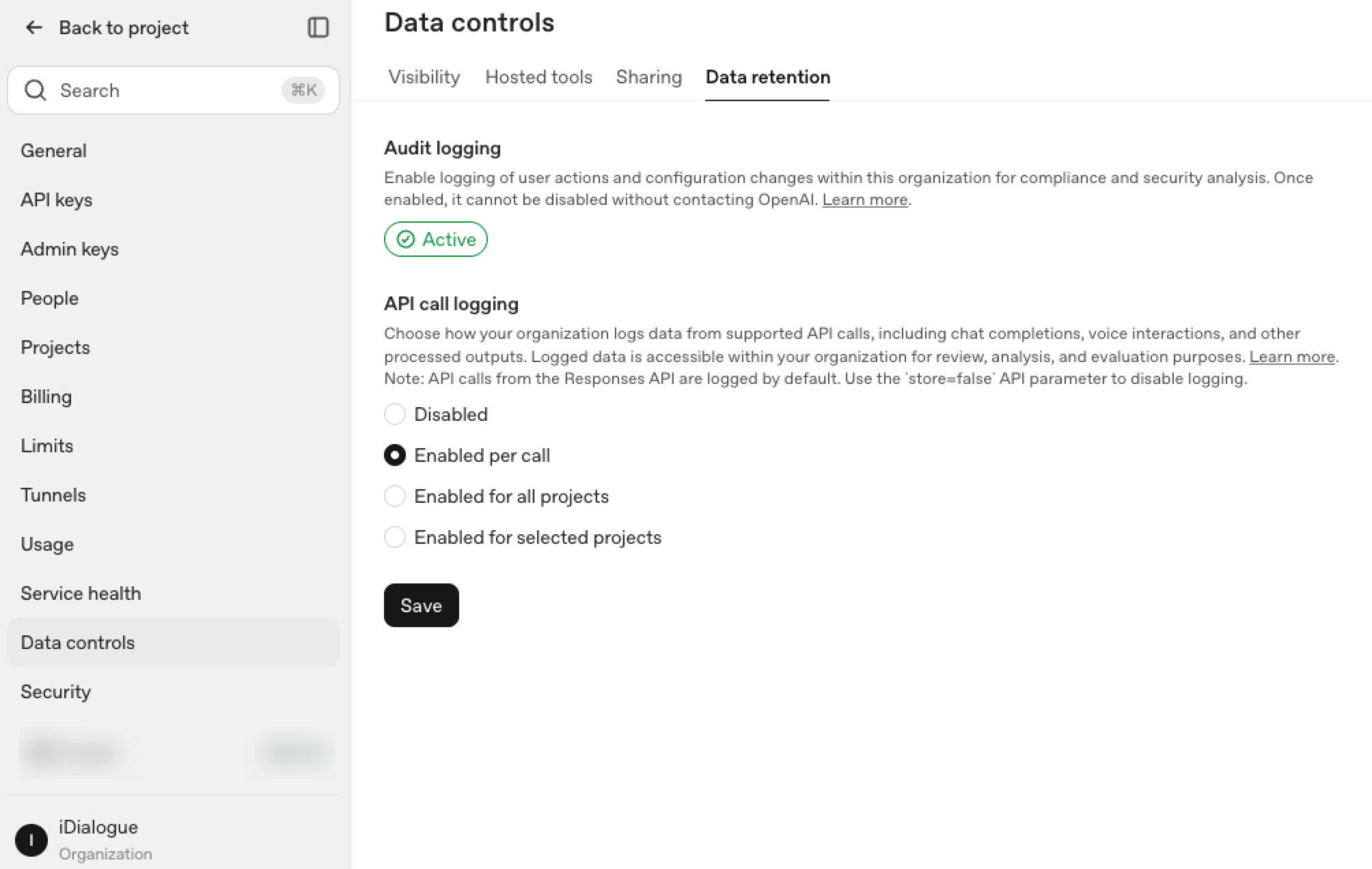
Some provider features retain response state under the provider's API controls to support retrieval, continuation, monitoring, or background processing. This application state is separate from model training, public ChatGPT history, cross-customer access, and iDialogue repository storage.
iDialogue records and artifacts
iDialogue may retain dialogue history, requested artifacts, Experience and Room content, completed business outcomes, operational records, and billing records for their defined purposes. Review those data classes under the applicable iDialogue policy and customer agreement.
A customer-provided key places provider-level administration within the customer's OpenAI organization, including provider usage visibility, billing, rate limits, and available account settings. It does not by itself determine Salesforce access, iDialogue retention, Room access, or another Connection's behavior.
Read the OpenAI Connection guide, the OpenAI Data Processing Addendum summary, and the Security & Data Handling page for the complete workflow context.
Transcripts and audit
Dialogue-based agent workflows can maintain an activity record containing:
- user and assistant messages;
- model and response identifiers;
- tool names, arguments, and returned details;
- token usage and processing metadata; and
- credit consumption and billing events.
These records support dialogue continuity, troubleshooting, governance review, usage reconciliation, and investigation.
Because transcripts and tool records may contain business-sensitive information, they should be treated as a distinct data class with their own access and retention considerations. Operational and security logs are separate records and may contain different information.
Usage and execution controls
iDialogue meters agent, model, file-processing, and workflow activity using credits. Usage records support customer visibility, billing, investigation, and capacity planning. Provider rate limits remain subject to the provider account, selected model, and current service conditions.
For approved deployments, customers may use their own provider credentials so provider billing, account administration, and rate limits remain within their governance boundary.
Recommended controls include:
- enable only the agents, skills, Connections, and background triggers required for the workflow;
- establish budgets and internal escalation thresholds;
- test retry and failure behavior to reduce unintended duplicate work;
- monitor active background work, iDialogue credits, and provider-account usage;
- stop background work when its assignment is complete or an exception requires review;
- separate experimentation from production credentials; and
- establish an owner for overage, capacity, and rate-limit decisions.
Governed workflow examples
Three common Salesforce workflows illustrate how agent governance applies in practice:
Understand a file
A user can provide a business card, RFP, agreement, image, or other file. An approved workflow can perform OCR, extract structured information, summarize content, answer questions, or propose Salesforce updates and next actions.
These task-based steps do not create conversational memory. Controls determine which file and Salesforce context are processed, which provider receives the required information, what Salesforce data may be created or updated, whether human review is required, and which requested artifacts or operational records are retained.
Generate a reviewed document
Salesforce context and an approved template can produce a proposal, agreement, quote explanation, handoff document, or other customer-facing artifact.
Controls determine which Salesforce fields are supplied, whether content is produced through a deterministic merge or AI-assisted workflow, where human review occurs, and where the resulting artifact may be delivered or shared. The secure iDialogue repository can retain approved artifacts while reducing the need to use Salesforce file storage.
Run a customer Experience
An approved Experience can share documents, collect forms, checklist responses, uploads, and review decisions, request eSignature, and write permitted outcomes to Salesforce. The workflow controls which members, content, actions, Salesforce fields, and approval points are available.
These examples illustrate common governance patterns rather than establishing one permission or retention model for every iDialogue feature. Use the Security & Data Handling page to trace the data flow for a specific deployment.
Review an agent before production
We can walk through a proposed agent's Salesforce access, data inputs, enabled tools, AI providers, approval requirements, storage, and audit trail before deployment. Contact support@idialogue.app.