Business or Salesforce user
Find guidance on agent authority, human review, and approval points.

Security, governance, and assurance for iDialogue
iDialogue connects Salesforce records, files, people, and AI-assisted workflows. This Trust Center explains how access is scoped, how agent actions are governed, how customer information is handled, and what evidence is available for security and procurement review.
No. Connecting iDialogue to Salesforce does not make CRM data available to public ChatGPT users or other iDialogue customers. Workflows operate within the customer's configured Salesforce connection and iDialogue tenant context. The connection identity, selected data, enabled tools, workflow rules, approvals, and sharing settings determine access.
Customer data processed through the iDialogue-managed OpenAI API integration is not used to train OpenAI models. Model training is separate from the provider processing and application state used to deliver API functionality.
An agent receives only the context and capabilities made available to its configured workflow. The Salesforce API connection user establishes the primary Salesforce permission boundary. Enabled skills, tools, object and field access, workflow instructions, and approval requirements narrow that authority further.
Retention supports defined business purposes. Approved dialogue context can support continuity. Task inputs support a requested operation. Repository artifacts and Experience content support review, delivery, eSignature, and later retrieval. Operational records support reliability, security, support, usage reconciliation, and billing. These data classes have different lifecycles.
iDialogue Experiences and Document Rooms are secure customer-facing workspaces for documents, checklists, forms, uploads, review, and eSignature. Data collected through a configured Experience may update the corresponding Salesforce record. Documents and related activity can remain available in the Room for the configured business lifecycle.
Public materials include security and privacy policies, Salesforce AppExchange Security Review information, provider contractual documentation, and scoped testing evidence. Detailed architecture, data-flow reviews, vulnerability findings, questionnaires, and other sensitive materials may be provided under NDA.
Find guidance on agent authority, human review, and approval points.
Find configuration guidance for Salesforce identity, permissions, Connections, agent tools, and sharing controls.
Review data lifecycles, tenant isolation, external providers, and available assurance evidence.
Find public policies, contractual safeguards, and available assurance materials.
Review the scope and evidence for iDialogue's successful AppExchange Security Review.
Understand how the Salesforce API connection user configured by the Salesforce Admin sets the primary permission boundary.
Review provider governance, dialogue continuity, task processing, application state, and customer configuration options.
Control which external services are connected and which approved agent skills are authorized to use them.
Control agent capabilities through the Salesforce connection user, enabled capabilities, workflow rules, approvals, and monitoring.
Understand how dialogue history, task inputs, Experience and Room content, repository artifacts, Salesforce writeback, and operational records are handled.
Understand how invited members access private Experiences and Document Rooms, how content is shared for review or eSignature, and how deliberately public publishing differs.
Access security and privacy policies, Salesforce review evidence, scanning results, and other assurance materials.
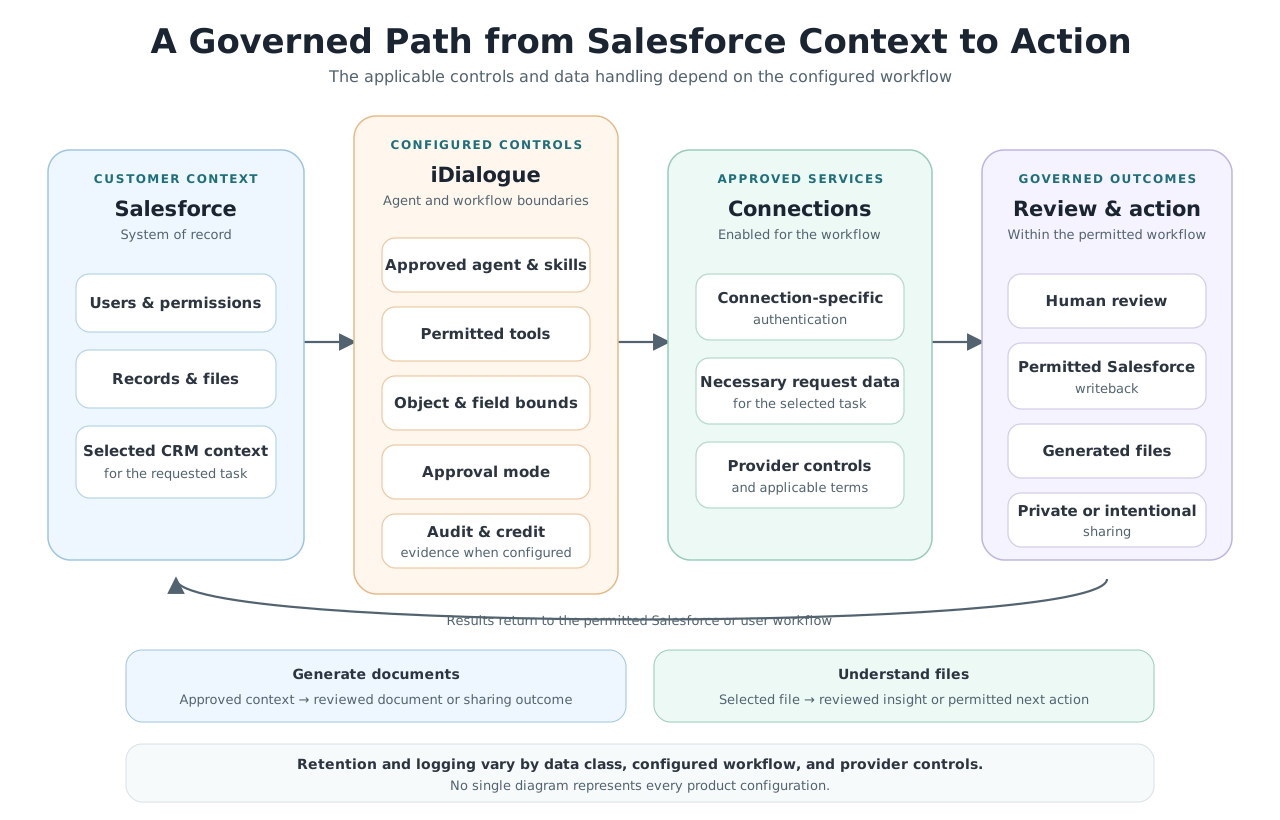
Connecting a Salesforce org does not create a public or cross-customer query path. Each workflow resolves within the applicable organization, connection, and configured access model.
Understand Salesforce and file data flows, encryption, retention, storage, Connections, sharing controls, and subprocessors.
Review how agent capabilities, tools, approvals, provider controls, transcripts, usage, and auditability are governed.
Access public policies, contractual safeguards, Salesforce Security Review information, vulnerability evidence, and other assurance materials.
Request security documentation at support@idialogue.app.
The iDialogue managed package successfully completed Salesforce's AppExchange Security Review on April 9, 2025. The review provides independent assurance for the package version and submission evaluated by Salesforce. Hosted services, later releases, customer configurations, and third-party providers have separate scopes. See review details.
Yes. Customer-provided OpenAI API keys are supported for approved deployments and can be associated with the customer's organization in iDialogue. The customer controls provider-account administration, including usage, billing, rate limits, and available settings. The key does not expand Salesforce access or replace iDialogue workflow controls. See the OpenAI Connection.
An agent can use only the Connections made available through its enabled skills. A service appearing in the Connections catalog does not mean it is configured, authorized, or used within a particular customer organization. Administrators can review configured Connections and the skills enabled for each agent. See the Connections catalog.
Yes. The iDialogue managed package provides 100% of the administrative experience within Salesforce. Some Connections, such as Twilio, Stripe, and Apollo.io, may require visiting a third-party service to configure or manage the integration.
iDialogue meters agent and processing activity using credits and records usage for billing and operations. Provider rate limits and model capacity are managed separately and may change over time. Administrators can define budgets and workflow permissions, monitor background work, and stop it when needed. See usage and execution controls.
No. iDialogue is a cloud-hosted solution. Content management and agentic processes run in cloud services, including Salesforce and our AWS subprocessor. Desktop AI and MCP connections are not required or currently supported.
Our team can provide a customer-specific security and data-flow review covering Salesforce access, selected fields and files, AI providers, agent capabilities, storage, sharing, and approval controls. Contact support@idialogue.app.
Ask about this page, related knowledge or specific iDialogue product and support features.