
Apollo.io CRM Enrichment
Use Apollo.io data inside Salesforce to improve Leads, Contacts, and Accounts that already exist in your CRM, without giving up human review.
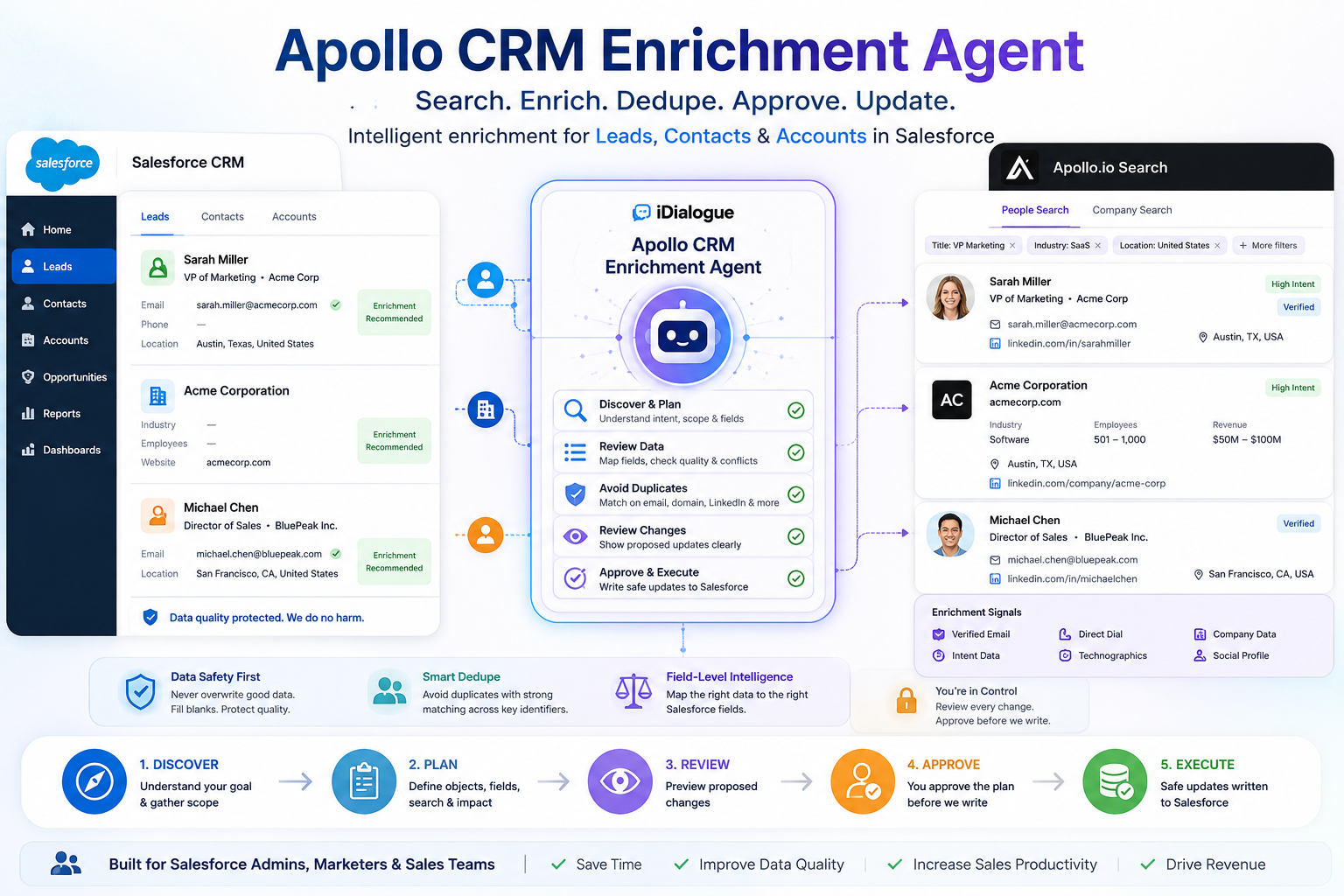
Apollo.io CRM Enrichment is an example context-preparation agent. It helps sales, revenue operations, and CRM teams compare Apollo.io values to current or selected Salesforce records, fill blanks, refresh approved fields, and apply updates only when the evidence is strong.
This page is provider-specific. iDialogue should remain positioned as a Salesforce sales document generation and sharing product, with Apollo as one optional data provider example.
Use Apollo.io Prospector Agent instead when the goal is net-new people or company search, territory list building, or technology-based discovery.
Why teams use this agent
- Reduce manual research for existing Salesforce Leads, Contacts, and Accounts.
- Enrich current or selected records with company, person, role, geography, and profile data from Apollo.io.
- Compare Apollo values against current CRM values before proposing updates.
- Check for duplicates before any approved record creation or update.
- Protect high-quality CRM fields from weak, stale, blank, or conflicting external data.
- Review expected Apollo credit usage before paid enrichment actions are run.
- Keep Salesforce writes approval-based instead of letting enrichment happen invisibly.
What it handles
- Enriches current or selected Salesforce Leads, Contacts, and Accounts when the user approves the Apollo credit impact.
- Uses focused Apollo search only when needed to resolve the best Apollo match for an existing Salesforce record.
- Retrieves current Salesforce data and potential duplicates before proposing changes.
- Confirms writable Salesforce fields before preparing insert or update actions.
- Builds review-ready field maps for Lead, Contact, and Account enrichment.
- Presents proposed Salesforce writes for approval before executing record updates.
- Checks Apollo usage stats when teams need visibility into consumption.
Inputs and prerequisites
- The iDialogue managed package installed in Salesforce.
- An active Apollo.io connection enabled for the Salesforce org.
- Permission to read the Salesforce records being enriched and to query possible duplicates.
- Permission to update only the Lead, Contact, Account, or custom fields your team allows for enrichment.
- Clear internal guidance for source-of-truth precedence, overwrite behavior, and which Apollo fields may be trusted.
- Apollo credit availability for enrichment calls that consume credits.
Setup and configuration
- Install Apollo.io CRM Enrichment from the Agent Gallery.
- Configure or reconnect the Apollo.io connection for the Salesforce org.
- Assign access to sales operations, revenue operations, or CRM admins responsible for CRM data quality and enrichment workflows.
- Define the approved field map for Leads, Contacts, and Accounts.
- Document which fields can be filled when blank, refreshed on request, or left recommendation-only.
- Test with a small set of known Salesforce records before enabling broader enrichment workflows.
Recommended operating model
Use the agent as a governed Discover, Plan, Review, Approve, Execute workflow.
During discovery, the agent clarifies whether the user wants to enrich the current record, enrich selected Leads, Contacts, or Accounts, review recommendations only, inspect usage, or apply approved Salesforce changes. During planning, it names the target objects, existing record scope, expected Apollo calls, possible credit impact, deduplication approach, and candidate fields. Before any Salesforce write, it reviews the exact proposed changes and waits for explicit approval.
This operating model is best for teams that need faster enrichment while still preserving CRM data quality and auditability.
Governance and controls
- Require explicit approval before enrichment calls that consume Apollo credits.
- Require explicit approval before any Salesforce insert, update, or upsert action.
- Prefer filling blank fields or fields the user explicitly asked to refresh.
- Do not overwrite strong Salesforce data with weaker, stale, blank, or conflicting Apollo data.
- Check duplicates with strong identifiers such as email, LinkedIn URL, domain, website, record id, and company name.
- Avoid creating placeholder records from partial or weak Apollo match results.
- Keep Apollo raw data out of Salesforce unless an approved destination field is provided.
Success metrics
- Higher completeness for approved Lead, Contact, and Account enrichment fields.
- Reduced manual research time for CRM enrichment and data cleanup workflows.
- Fewer duplicate Leads, Contacts, or Accounts created during enrichment.
- Higher confidence in field updates because proposed writes are reviewed before execution.
- Better visibility into Apollo credit consumption and enrichment usage patterns.
Next steps
- Review the Apollo.io Connection guide before enabling enrichment workflows.
- Use Apollo.io Prospector Agent when the team needs net-new Account or Contact list building.
- Pair with Account Intelligence when teams need broader account context for document generation and planning.
- Use Account Context for the provider-neutral workflow.
- Use Lead Assignment Agent after enrichment when routing depends on territory, segment, or profile fields.