
iDialogue is implementing enhanced OAuth security controls for Salesforce connections in alignment with Salesforce's connected app security guidance. As part of that update, Salesforce Admins should complete a quick one-time reauthorization in Salesforce any time after 1:00 PM PT / 4:00 PM ET on Friday, May 1, 2026, and preferably within 72 hours of the change, to keep their iDialogue connection active.
Most admins can complete this in about 5 minutes from the Quick Start tab.
Add to Calendar
Save a reminder for the recommended earliest reauthorization time:
Fri May 1st, 1:00 PM PT / 4:00 PM ET
The .ics file works with Apple Calendar, Outlook desktop, and most calendar apps.
FAQ
What is happening?
iDialogue is updating its Salesforce connection security model with enhanced protections aligned with updated Salesforce platform requirements.
Why do I need to take action?
To keep your iDialogue connection active, complete a quick one-time reauthorization after the updated security settings are enabled.
What do I need to do?
Open the iDialogue Admin app in Salesforce, go to the Quick Start tab, and click Reconnect iDialogue (or Connect API, depending on version). Then follow the Salesforce authentication steps to validate the API user credentials.
When should I do it?
We recommend starting the reauthorization any time after 1:00 PM PT / 4:00 PM ET on Friday, May 1, 2026. iDialogue plans to enable the updated OAuth settings at 12:00 PM PT, and waiting one hour allows the updated settings to propagate. Please complete the reauthorization preferably within 72 hours of the change.
Can I refresh the connection first thing Monday morning on May 4th?
This is generally safe, but depends on how Salesforce refreshes security tokens. There is no specific guidance on this.
We know the next refresh will occur within 1–30 days of activating the PKCE feature, and that existing connections will fail if still using pre-PKCE tokens.
How long will it take?
Most Salesforce Admins can complete the reauthorization in about 5 minutes.
What happens if I wait too long?
If the connection is not reauthorized during the recommended window, some customers may begin to see connection issues by the start of business on Monday, May 4, 2026.
Do I need a package upgrade?
No. A package upgrade is not required for this update.
Timeline
Saturday April 25, 2026
iDialogue plans to enable background security controls related to Salesforce's updated connected app requirements. No customer action is required for this step.
Friday May 1, 2026 at 12:00 PM PT
iDialogue plans to enable the PKCE-specific security update for connected app authentication.
Friday May 1, 2026 at 1:00 PM PT / 4:00 PM ET
Salesforce Admins should begin the recommended one-time reauthorization from the Quick Start tab any time after this point. Waiting one hour allows the updated OAuth settings to propagate.
Preferably within 72 hours of the Friday May 1, 2026 change
Salesforce Admins should complete the one-time reauthorization from the Quick Start tab in Salesforce. This is the preferred action window following the change enabled at 12:00 PM PT on Friday, May 1.
Monday May 4, 2026
Customers who have not completed the reauthorization by then may begin to see connection issues as Salesforce applies the updated security policy to existing connections.
Reauthorize Your Connection
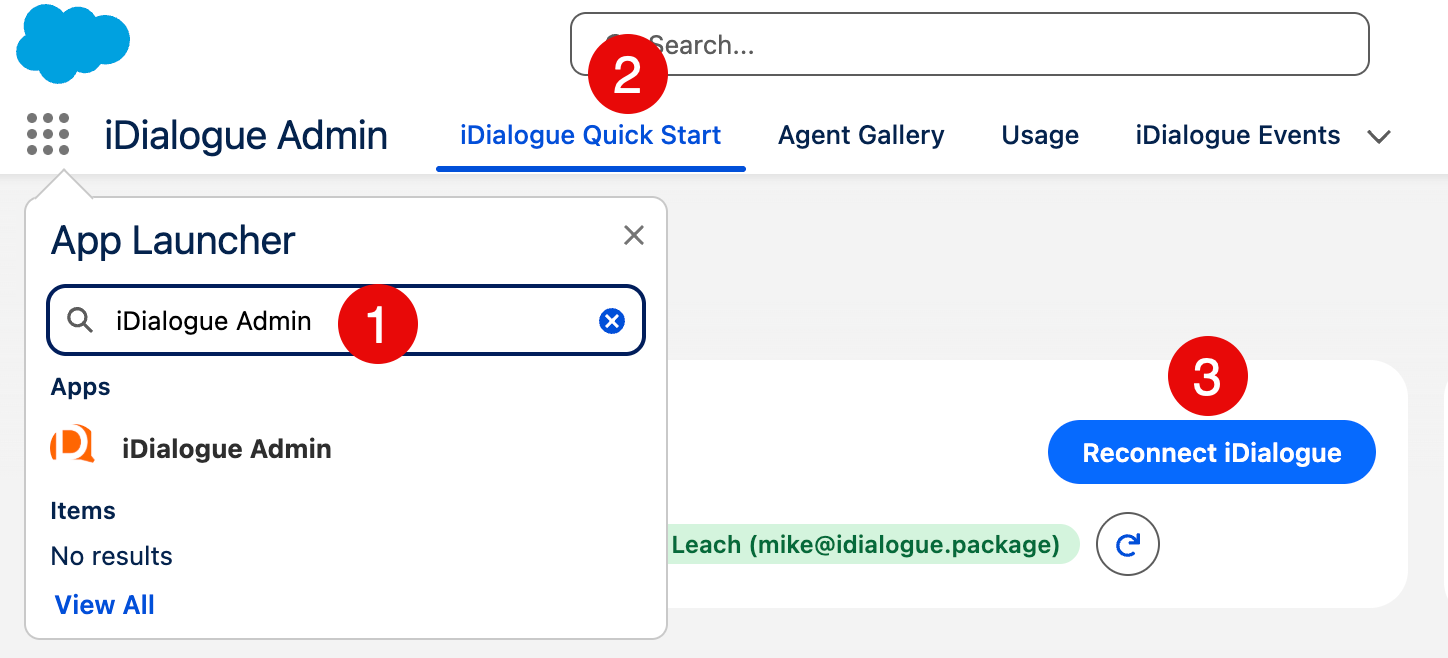
After 1:00 PM PT / 4:00 PM ET on Friday, May 1, 2026, and preferably within 72 hours of the change, complete the following steps:
- Log in to Salesforce and, from the App Launcher, search for iDialogue Admin
- Click the Quick Start tab
- Click Reconnect iDialogue (or Connect API, depending on version), then follow the Salesforce authentication steps to validate the API user credentials
Most admins can complete this in about 5 minutes.
Expected Impact
- No package upgrade is required
- Most customers can complete the update in a few minutes
- Customers who reauthorize during the recommended window should avoid start-of-week disruptions
- Salesforce is applying these connected app security requirements broadly across partners
Technical Security Details
Salesforce's updated connected app security program includes several OAuth-related controls that partners like iDialogue are implementing ahead of Salesforce's broader Monday, May 11, 2026 deadline.
Saturday April 25, 2026 --- Background Security Controls
- Refresh Token Rotation (RTR) enabled at 12:00 PM PT
- Static IP enforcement for the originating connection enabled
- A 30-day timeout for unused refresh tokens
- No customer action required for this step
- We will monitor connections throughout the weekend and communicate any discrepancies
Because iDialogue implements a daily heartbeat service to maintain active connections, we do not anticipate customer connections timing out due to non-use.
Friday May 1, 2026 --- Enhanced Authorization Controls
- Planned enablement at 12:00 PM PT
- This phase includes PKCE and related OAuth authorization protections
- Customers should reauthorize any time after 1:00 PM PT / 4:00 PM ET to allow the updated settings to propagate
- All customers should preferably complete a one-time reauthorization through the iDialogue Quick Start tab within 72 hours of the change
Security Terms Referenced On This Page
- PKCE (Proof Key for Code Exchange) adds additional protection to the OAuth authorization step
- Refresh Token Rotation (RTR) helps reduce refresh-token replay risk
Why Timing Can Vary By Org
Salesforce connections refresh on different schedules. After the May 1 enablement, existing connections may transition at different times depending on when the next token refresh occurs.
- Existing connections do not all transition at once
- The next refresh may occur anywhere between 1 hour and ~1400 hours (≈60 days)
- At that point, Salesforce may require the connection to be re-established under the updated security policy
Package Upgrade
No package upgrade is required for this change.
iDialogue is also using this security work to accelerate its 1GP to 2GP package migration, along with a new External Client App (ECA) for more granular configuration and control. That broader launch is planned for Q3 2026 and is separate from the reauthorization step described above.
Support
If you experience issues reauthorizing:
Dates, rollout sequencing, and recommended customer actions reflect our current implementation plan and may change as Salesforce publishes additional guidance. This page will be updated as that guidance becomes available.