
Room Viewer
Room Viewer is a Salesforce Lightning Web Component for records that already have iDialogue rooms. It gives sales users a simple, read-only view of room status, quote documents, invited members, and activity directly from the Salesforce record page.
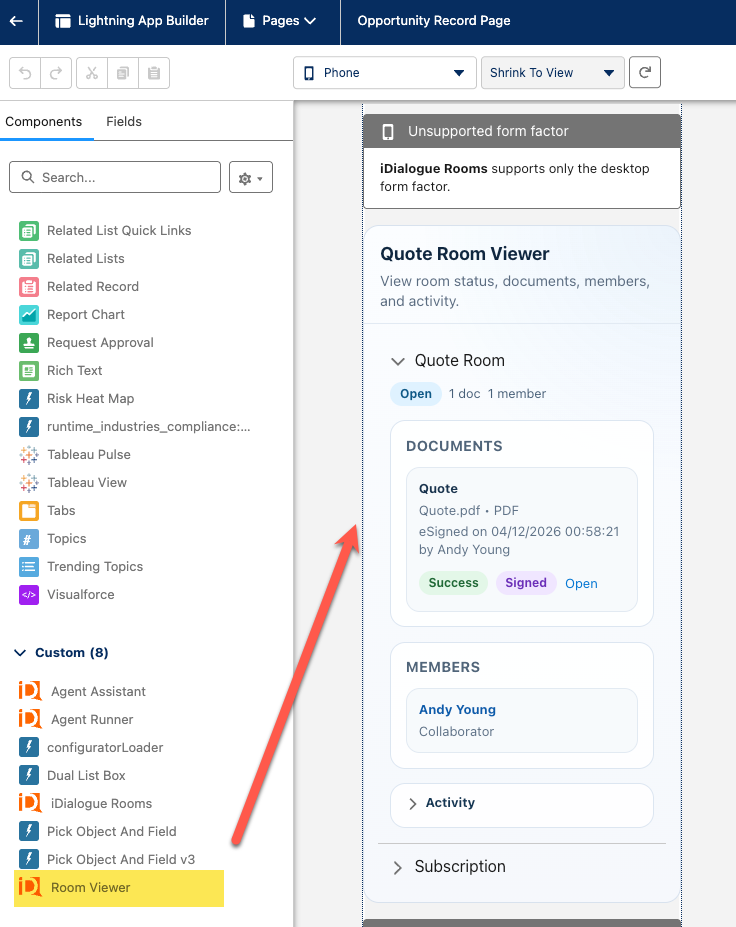
This component is especially useful when:
- your sales team works primarily in the Salesforce mobile app
- rooms or quote packets are created automatically by record-triggered flows
- sales users need to review room progress without opening the legacy room experience
What sales users can do
After the component is added to a Lightning page layout, users can:
- expand a room by template name
- review room documents and status
- open generated room documents
- see invited members
- review recent room activity
The component supports both desktop and mobile form factors, but it is particularly useful for mobile-first sales workflows.
Before you add Room Viewer
Make sure:
- the iDialogue managed package is already installed
- your automation already creates rooms for the target object
- users have access to the source record and related iDialogue room data
- the object uses a Lightning record page that is assigned to the right app, record type, and profile
Add Room Viewer to a Lightning page layout
Use Lightning App Builder to place the component on the record page used by your sales team.
- In Salesforce Setup, open
Lightning App Builder. - Open the record page for the object where your flow creates rooms, such as an Opportunity, Case, or custom object.
- Drag the
Room Viewercomponent onto the page. - Optionally set the component title.
- Save the page.
- Click
Activateand assign the page to the correct app, record type, and profile. - Test the page in Lightning Experience and in the Salesforce mobile app.
For mobile-first teams, place Room Viewer high enough on the page that reps can review room status without scrolling past unrelated fields first.
Recommended admin use case
Room Viewer works well in this pattern:
- A record-triggered flow creates the room and quote documents.
- The sales rep opens the record in Salesforce.
- The rep reviews the room, documents, members, and activity from the record page.
This keeps the room experience embedded in Salesforce and reduces the need for users to switch into a separate UI just to check quote or room progress.
What the component shows
Depending on the room, users may see:
- the room template name
- document rows and status
- invited members and room owner details
- room activity history
The component is intentionally read-only. It is designed for visibility and review rather than room setup or administration.
Troubleshooting
If Room Viewer is added but does not show the expected content:
- If no rooms appear, confirm that your flow or automation actually created a room for that record.
- If the component is not visible for mobile users, confirm the active Lightning record page assignment is correct for those users.
- If users cannot open documents, confirm the room item was generated successfully and the user has access to the underlying record.
Best fit scenarios
Room Viewer is a strong fit when:
- quote rooms are generated automatically
- field sales users rely on the Salesforce mobile app
- admins want a simple embedded record page experience
- users mostly need to monitor room progress rather than manage room configuration