
If your iDialogue connection to Salesforce is no longer working due to a recent Salesforce security update, your Salesforce Admin likely needs to reauthorize the connection.
iDialogue enabled enhanced Salesforce OAuth security controls on Friday, May 1, 2026. Customers were asked to reconnect after 1:00 PM PT / 4:00 PM ET as part of the Salesforce OAuth security update. If that reauthorization was missed, Salesforce may reject the older connection token when it refreshes, which prevents iDialogue from connecting to your Salesforce org until the connection is reauthorized.
Most admins can complete this in about 5 minutes from the Quick Start tab.
Reauthorize Now
- Open Salesforce and launch iDialogue Admin from the App Launcher.
- Open the Quick Start tab.
- Click Reconnect iDialogue or Connect API, then complete the Salesforce sign-in steps.
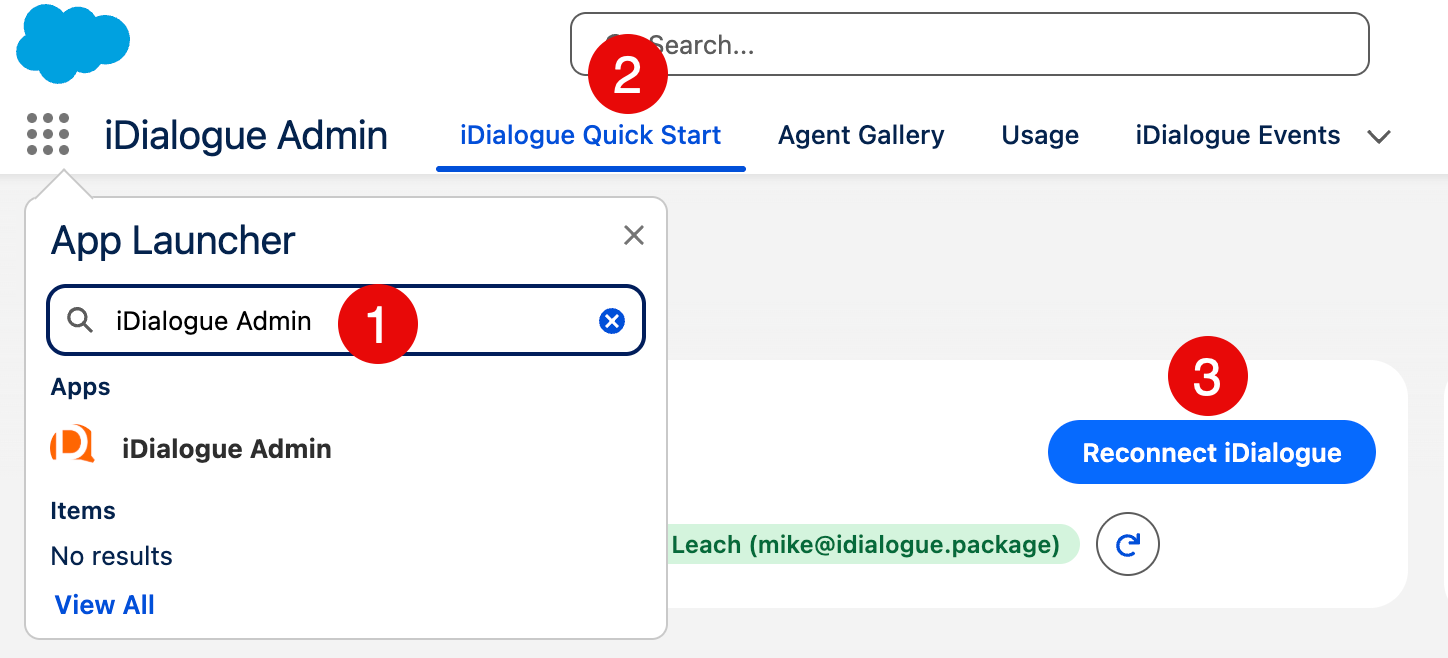
After the reconnect completes, return to the iDialogue workflow that was failing and try it again.
What Happened?
iDialogue updated its Salesforce connected app settings to align with Salesforce's OAuth security requirements, including PKCE and Refresh Token Rotation protections. These changes improve connection security, but they require a one-time reauthorization so Salesforce can issue updated credentials for the iDialogue connection.
No iDialogue package upgrade is required for this reconnect step.
Still Having Trouble?
If the reconnect button is missing, the Salesforce sign-in fails, or iDialogue still cannot connect after reauthorization, contact iDialogue Support:
For the full timeline and technical details, see Salesforce OAuth Security Update: PKCE and Refresh Token Rotation.